[Avg. reading time: 15 minutes]
Types of Cloud Services
SaaS: Software as a Service
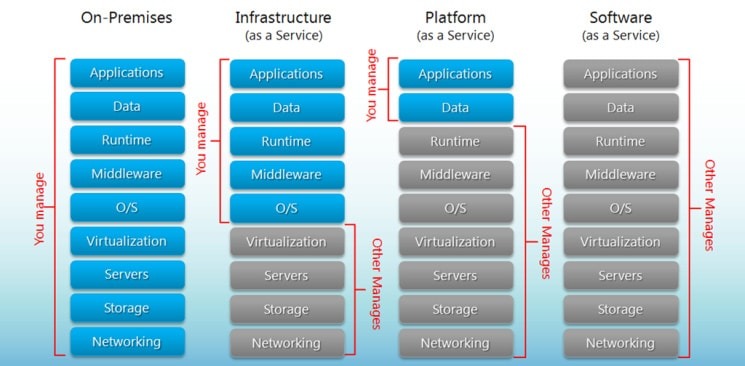
SaaS delivers ready-to-use software applications over the internet. Users do not manage the infrastructure, platform, or most application settings.
Examples:
- Google Workspace
- Dropbox
- Slack
- Salesforce
Key Characteristics
- Accessed through a web browser or thin client
- Managed centrally by the provider
- Usually follows a multi-tenant model
- Updates and patches are handled by the provider
- Minimal setup and maintenance for users
When Not to Use SaaS
- Limited or unreliable internet access
- Mission-critical workloads with very low downtime tolerance
- Applications requiring deep customization
- Tight integration with specialized on-premise hardware
- Strict data residency or regulatory constraints
- Performance-sensitive workloads that depend on local execution
PaaS: Platform as a Service
PaaS provides a managed environment for building, deploying, and running applications without requiring users to manage the underlying infrastructure.
Examples:
- Heroku
- Streamlit
- PythonAnywhere
Key Characteristics
- Developers focus on application code, not infrastructure
- Built-in support for deployment, scaling, and monitoring
- Provider manages runtime, middleware, patches, and much of the operations work
- Speeds up development and release cycles
- Often integrates well with CI/CD pipelines
When Not to Use PaaS
- Risk of vendor lock-in
- Limited control over infrastructure and runtime configuration
- Specialized compliance or security requirements
- Need for unsupported languages, frameworks, or custom system dependencies
- Performance-sensitive workloads needing low-level tuning
- Applications tightly coupled with legacy systems or custom middleware
IaaS: Infrastructure as a Service
IaaS provides virtualized compute, storage, and networking resources over the internet. Users manage the operating systems, middleware, and applications, while the provider manages the physical hardware.
Examples:
- Amazon EC2
- Google Compute Engine
- Microsoft Azure Virtual Machines
Key Characteristics
- High flexibility and control
- Resources can scale up or down based on demand
- Pay-as-you-go pricing
- Suitable for lift-and-shift migrations
- Supports custom operating systems and software stacks
When Not to Use IaaS
- High operational complexity
- Teams lack infrastructure expertise
- Ongoing maintenance overhead for OS, patches, and security
- Predictable workloads that may be cheaper or simpler on other models
- High availability and disaster recovery require careful design
- Compliance and security responsibilities remain heavily on the user
DBaaS: Database as a Service
DBaaS provides a fully managed database in the cloud. The provider handles infrastructure, provisioning, patching, backups, scaling, and high availability, while users focus on storing, querying, and managing data.
Examples:
- Neon (PostgreSQL)
- Amazon RDS
- Google Cloud SQL
- Azure SQL Database
- ClickHouse Cloud
Key Characteristics
- Managed database infrastructure
- Automated backups and recovery
- Built-in scaling and replication options
- Reduced operational overhead
- Users focus on schema, queries, and data access
When Not to Use DBaaS
- Need deep control over database internals or host OS
- Strict latency requirements with on-premise systems
- Regulatory or data residency constraints
- Very specialized database tuning or custom extensions
- Workloads where self-managed databases are more cost-effective at scale
Easy Way to Remember
- PaaS: deploy your application
- DBaaS: use a managed database for your application
Comparison between Services
FaaS: Function as a Service
FaaS, often associated with serverless computing, lets developers run event-driven functions without managing servers. The cloud provider handles provisioning, scaling, and infrastructure maintenance.
Examples:
- AWS Lambda
- Azure Functions
- Google Cloud Functions
Key Characteristics
- Event-driven execution
- Automatic scaling
- Pay only for execution time and resources consumed
- No server provisioning or management
- Well suited for lightweight, modular workloads
When Not to Use FaaS
- Long-running tasks
- Complex stateful workflows
- Latency-sensitive applications affected by cold starts
- Heavy compute-intensive jobs
- Strong dependence on provider-specific services
- Constant, predictable workloads where containers or VMs may be more efficient
Quick Comparison
| Model | What You Manage | What Provider Manages | Best For |
|---|---|---|---|
| SaaS | Minimal user settings and usage | Application, platform, infrastructure | End-user software |
| PaaS | Application code and data | Infrastructure, OS, runtime, middleware | App development and deployment |
| IaaS | OS, middleware, apps, data | Physical hardware, virtualization | Maximum control and flexibility |
| FaaS | Function code and logic | Infrastructure, scaling, execution environment | Event-driven, serverless workloads |
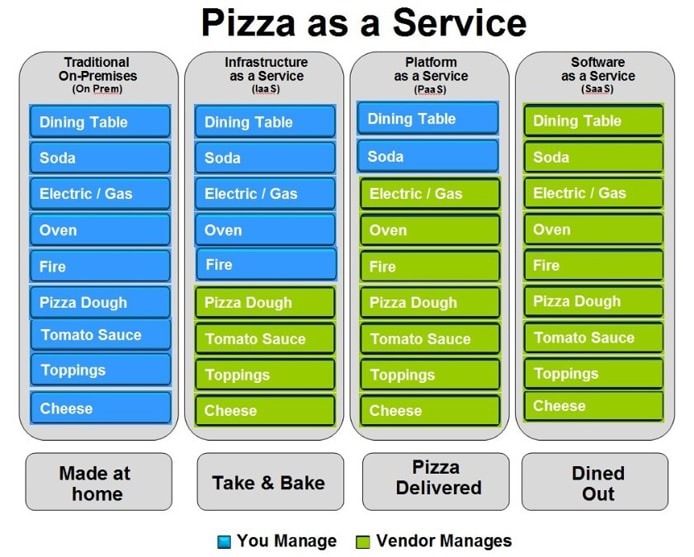
Easy way to remember SaaS, PaaS, IaaS
- SaaS: Use the software
- PaaS: Build the software
- IaaS: Manage the software and OS on rented infrastructure
- FaaS: Run small functions without managing servers
#saas #iaas #paas #faas #dbaas
1: src: http://bigcommerce.com